 |
| How to Add Read more button To Blogger below every Post |
| Step 1: Go to DashboardStep 2: Click on Template
Step 3: Edit Html Step 4: Check expand widget Step 5: search </head> Steb 6: Paste code From below box exatly before </head> <script type='text/javascript'>
summary_noimg = 250;
summary_img = 200;
img_thumb_height = 150;
img_thumb_width = 150;
</script>
<script type='text/javascript'>
//<![CDATA[
function removeHtmlTag(strx,chop){
if(strx.indexOf("<")!=-1)
{
var s = strx.split("<");
for(var i=0;i<s.length;i++){
if(s[i].indexOf(">")!=-1){
s[i] = s[i].substring(s[i].indexOf(">")+1,s[i].length);
}
}
strx = s.join("");
}
chop = (chop < strx.length-1) ? chop : strx.length-2;
while(strx.charAt(chop-1)!=' ' && strx.indexOf(' ',chop)!=-1) chop++;
strx = strx.substring(0,chop-1);
return strx+'...';
}
function createSummaryAndThumb(pID){
var div = document.getElementById(pID);
var imgtag = "";
var img = div.getElementsByTagName("img");
var summ = summary_noimg;
if(img.length>=1) {
imgtag = '<span style="float:left; padding:0px 10px 5px 0px;"><img src="'+img[0].src+'" width="'+img_thumb_width+'px" height="'+img_thumb_height+'px"/></span>';
summ = summary_img;
}
var summary = imgtag + '<div>' + removeHtmlTag(div.innerHTML,summ) + '</div>';
div.innerHTML = summary;
}
//]]>
</script>
|
Step 7: Now paste code from Below box before this code<data:post.body/>
Note: for search You must have check expand widget template<b:if cond='data:blog.pageType != "static_page"'>
<b:if cond='data:blog.pageType != "item"'>
<div expr:id='"summary" + data:post.id'><data:post.body/></div>
<script type='text/javascript'>createSummaryAndThumb("summary<data:post.id/>");</script>
</b:if>
</b:if>
<b:if cond='data:blog.pageType == "item"'><data:post.body/></b:if>
<b:if cond='data:blog.pageType == "static_page"'><data:post.body/></b:if>
<b:if cond='data:blog.pageType != "static_page"'>
<b:if cond='data:blog.pageType != "item"'>
<div style='float:right;margin-right:10px;margin-top:5px;'>
<a expr:href='data:post.url'>Read More</a>
</div>
</b:if>
</b:if>
Step 8: You have to save TemplateDone you have done…… |

Wednesday, 15 January 2014
How to Add read more button to blogger


Samsung 85″ Ultra High Definition TV Finally Arrives In Ghana

Samsung Electronics West Africa has introduced onto the Ghanaian
market, its latest, super-sized 85-inch Ultra High-Definition (UHD)
TVs which is set to redefine TV watching experience with an
impressive resolution which is four times more than that of regular
full HD TVs.
According to Mr. Richard Nunekpeku, Marketing Manager for
Consumer Electronics at Samsung West Africa, the electronics giants
are building on their leadership on the Smart TV platform with the
85” UHD TV which offers a blend of technology and craftsmanship to
deliver greater detail, unmatched clarity and an immersive and vivid
picture quality to viewers. “The LED panel of the new UHD TVs
produces crisp detail along with optimal colour and contrast, while
the Quadmatic Picture Engine adapts the source image, eliminates
visual noise and improves the detail and sharpness of the image
before up-scaling the picture to be displayed in Ultra HD resolution”
He added.
Samsung has also used its Precision Black Pro technology and Micro
Dimming Ultimate feature in the new 85-inch UHD TV. This provides
better brightness, contrast with the deepest blacks, and real 4K
resolution using proprietary algorithms. The new range of Samsung
UHD TVs features narrow bezels, metal stand and metallic finish and
its design hides the built-in speakers and subwoofers that produce
70W audio. The One Connect Box used in these TVs removes cable by
aggregating all connectors from multimedia players.
Simple Way to Increase Your Facebook Fan Page Fans
Facebook is one of the best free source of traffic for bloggers and
internet marketers. Facebook page is one of the easiest way to get
started with driving traffic on your blog, and I have already shared how to create a Facebook fan page for your blog. Now, the question many users have is how to increase likes on Facebook pages. One of the easiest way is to add Facebook fan page widget on your website and start making your Facebook page popular.
Update: This article is updated in 2014 with screenshot of new Facebook fan page design.
Facebook fan page almost work like feed subscriber. When a user click on like button of any page, he will see the updates on his/her Facebook wall. Though you have to make sure you write engaging updates, so that Facebook edgerank algorithm will show all the updates to your Fans. So your first goal should be getting more Fans into your Facebook Fan page of your blog.
The first and simple way to have more fan is by inviting your group of friends to become a part of your Facebook fan page.
Here is a quick two-step process to invite your friends to become your Facebook Fan page Fan:
Go to your Facebook Fan page and on the right side you will see how many of your friends have liked your page and you can also invite users individually to like your page. A good idea is to click on “See all” and select all users and invite them to join your Facebook page. Specially if you have a large set of friends on Facebook, you will be able to get many likes by inviting your friends.
Follow the below screenshot to understand the process:

Now select the friends whom you want to invite and once you have selected your friends click on Send invitation. Do remember, by default Facebook will show friends you have interacted recently. You might like to change it to search all friends and select all friends. If you have a long list of friends, you can use select all friends chrome extension to make things easier for you.

Now once your friends will accept your invitation, they will become a fan of your Facebook Fan page and also this update will available on their friends wall. If the page is interesting more users will join the same way.
Make sure your landing page should be useful and you are inviting targeted people. For example when you have a blog about hard core technology, probably girls will be least interested for the same. So target guys for the same and avoid inviting girls. Here are few more articles that will help you to increase the likes on your Facebook page:
This is one of the simplest trick which I can think of in order to increase your Facebook Fan page followers in simplest way. Do share your tip to increase your Facebook fan page followers?
Update: This article is updated in 2014 with screenshot of new Facebook fan page design.
Facebook fan page almost work like feed subscriber. When a user click on like button of any page, he will see the updates on his/her Facebook wall. Though you have to make sure you write engaging updates, so that Facebook edgerank algorithm will show all the updates to your Fans. So your first goal should be getting more Fans into your Facebook Fan page of your blog.
The first and simple way to have more fan is by inviting your group of friends to become a part of your Facebook fan page.
Here is a quick two-step process to invite your friends to become your Facebook Fan page Fan:
Go to your Facebook Fan page and on the right side you will see how many of your friends have liked your page and you can also invite users individually to like your page. A good idea is to click on “See all” and select all users and invite them to join your Facebook page. Specially if you have a large set of friends on Facebook, you will be able to get many likes by inviting your friends.
Follow the below screenshot to understand the process:
Now select the friends whom you want to invite and once you have selected your friends click on Send invitation. Do remember, by default Facebook will show friends you have interacted recently. You might like to change it to search all friends and select all friends. If you have a long list of friends, you can use select all friends chrome extension to make things easier for you.
Now once your friends will accept your invitation, they will become a fan of your Facebook Fan page and also this update will available on their friends wall. If the page is interesting more users will join the same way.
Make sure your landing page should be useful and you are inviting targeted people. For example when you have a blog about hard core technology, probably girls will be least interested for the same. So target guys for the same and avoid inviting girls. Here are few more articles that will help you to increase the likes on your Facebook page:
- 15 stunning ways to increase Facebook fan page likes
- Facebook page promoter lightbox WordPress plugin
This is one of the simplest trick which I can think of in order to increase your Facebook Fan page followers in simplest way. Do share your tip to increase your Facebook fan page followers?
How to Create A Facebook Fan Page For Your Blog
One of the most common branding tip which you will get for
your Business or for your Website is to create Facebook page. Here I’m
sharing a complete tutorial on How to create Facebook page for
your Business Website.If you are not sure why you should create a
Facebook page, read below. In this post we will look into the same
factor about Facebook fan page, and your target should be: Having
a Facebook fan page for your brand in 15 minutes.
 For example, you need a Fan page for your Website or Blog, select
“Brand or Product” and select Websites from Drop-down. Then, add your
brand name. This is not vanity URL and you can add custom URL for your fan pagelater.
For example, you need a Fan page for your Website or Blog, select
“Brand or Product” and select Websites from Drop-down. Then, add your
brand name. This is not vanity URL and you can add custom URL for your fan pagelater.
 Click on Get started, and next step is to add an Avatar for your Fan
page. I would suggest, use your official Gravatar and if you don’t have
any Gravatar, you can always create a Pic for your Fan page and keep it
close to your brand logo. Max size for your Faceboook Fan page profile
pic is 180*540 Px. Once you done uploading picture to your newly created
Facebook fan page, Facebook give you an option to invite your friends
to Fan page. You can skip it for now and use this feature later. On next
page add your Website details and click on Continue. Once done, you
will have a page like this (Below) and you can hit like and recommend
people and also edit page settings.
Click on Get started, and next step is to add an Avatar for your Fan
page. I would suggest, use your official Gravatar and if you don’t have
any Gravatar, you can always create a Pic for your Fan page and keep it
close to your brand logo. Max size for your Faceboook Fan page profile
pic is 180*540 Px. Once you done uploading picture to your newly created
Facebook fan page, Facebook give you an option to invite your friends
to Fan page. You can skip it for now and use this feature later. On next
page add your Website details and click on Continue. Once done, you
will have a page like this (Below) and you can hit like and recommend
people and also edit page settings.

Notice the pointers and follow the notes added below:
I would love to know if this tutorial helped you to create Facebook page for your business or website or not? Do you think it’s necessary to have Facebook page for every brand and business?
Why you need a Facebook page for your business?
Facebook is one of the most popular social
networking website with 850+ million users. By creating a Fb fan page,
you are helping your possible readers, client, customers to connect with
you. Now, depending upon your social media skills, you can engage your
Facebook fans into conversations and make your brand more prominent. In
fact, many companies are using Facebook as an announcement channel.  Facebook
is one of the biggest marketing and branding tool if you use it wisely.
Do you remember Vodafone ZooZoo’s which become very popular after the
launch and Facebook played a major role for the same. If you have been
ignoring Facebook till now for Marketing and Branding, you are losing a
significant amount of readers and client for your blog and service.
There are many other usage of Facebook and we will discus that in some
other posts, but for now lets get back to our topic:
Facebook
is one of the biggest marketing and branding tool if you use it wisely.
Do you remember Vodafone ZooZoo’s which become very popular after the
launch and Facebook played a major role for the same. If you have been
ignoring Facebook till now for Marketing and Branding, you are losing a
significant amount of readers and client for your blog and service.
There are many other usage of Facebook and we will discus that in some
other posts, but for now lets get back to our topic:
Facebook
is one of the biggest marketing and branding tool if you use it wisely.
Do you remember Vodafone ZooZoo’s which become very popular after the
launch and Facebook played a major role for the same. If you have been
ignoring Facebook till now for Marketing and Branding, you are losing a
significant amount of readers and client for your blog and service.
There are many other usage of Facebook and we will discus that in some
other posts, but for now lets get back to our topic:Step by step tutorial: How to Create Facebook page
As I mentioned above, Facebook Fan Page helps you into Branding, Socializing and more over sending a message to all your Blog or service Fans. If you have now created a Facebook fan page for your blog, do it now and enjoy and take your brand to next level.
Selecting type of page:
Go to this create Facebook pagelink
and select the type of business you are having. Selecting proper
category, will help your brand to reach the right audience.
Selecting Facebook Page type
Facebook fan Page Website Category
How to Edit Facebook page settings:
So once you have learned how to create Facebook fan page, it’s time to learn how to edit Fan page. Look at this screenshot and it will give you a great deal of idea about customization on Facebook fan page.
1) Fan page wall:
Like our Facebook profile, this is wall for Facebook page. You can
use it to upload images, text, share links, ask questions and upload
videos. I would suggest, you to use it creatively. Apart from publishing
your latest post to Fan page using RSS Graffiti, I also suggest you to
work on asking interesting question and engage your users in a
conversation.
2-3) Edit fan page:
Both the links can be use to edit your Fan page. It takes you to
admin management page of Facebook and you can do hell lot of things
related to your newly created fan page from there.
4) Use Page as Profile:
Sometime back, Facebook added a new feature to Facebook page for
businesses, and it let you use Facebook as a profile. You can like other
Facebook pages and comment using your Fb fan page name. Though, you
can’t add other user Facebook profile but as a branding point of view,
you can use this feature for making your reach more wider. You can use
Facebook as your Fan page and get into conversation with any famous page
discussion. If you are an expert, your answer will help you to get
genuine fans.
5) Facebook Fan page SEO:
In this post, I’m not going to discus how to SEO optimize Facebook
page, but about part works as a meta discription in search engine. So,
use your about me carefully and it’s easier to rank for any Keyword
using Facebook page, so pick your name and about section carefully.
6) Fan count:
That’s one number which you would always like to see increasing. You
can refer to my other posts on increasing fans on your Facebook page and
see this number grow. One of the easiest way to increase fans to your
newly created Fb fan page is by adding Fan box widgeton
your Website. There are many other things which you can do is, link
your Facebook fan page with Twitter and all your updates will
automatically posted on Twitter too. Anyways, that’s for later but for
now, as a Facebook fan page admin, I would suggest you to read following
posts:- How to ban a Spammer on Facebook Page
- How to unban on Fb Fan Page
- How to embed Aweber Email form into Facebook fan Page
I would love to know if this tutorial helped you to create Facebook page for your business or website or not? Do you think it’s necessary to have Facebook page for every brand and business?
How to Get Facebook Page Notification Via Emails
I have set up my own Fan Page on Facebook and its really easy to make
one but the problem is, I couldn’t find any options that will alert me
whenever there’s a new comment or post on my wall. So what will happen
is that, I have to check my Facebook fan page from time to time to see
whether or not I have new comments or post on my wall, isn’t it uneasy?
More over, it’s important for us to monitor what our competitor is doing
on their Facebook page to keep an eye on what’s happening.
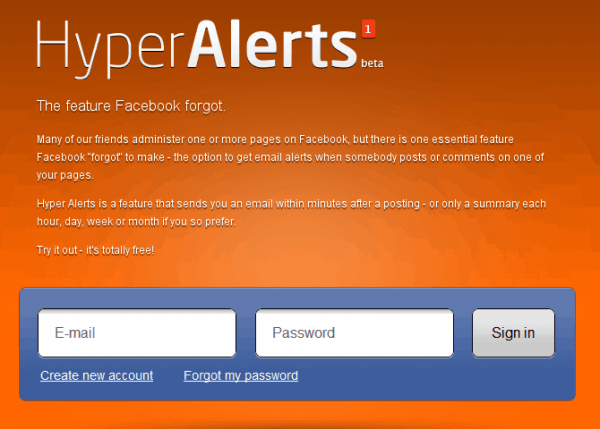
Well, gladly there’s a solution for that problem. The website name HyperAlerts has able to recognized this problem in which Facebook has failed to add. The website alerts you when someone has posted or leave comments to your fan page via email. So if you’re managing Facebook fan page, then this tool is another one you need. Another thing also is that, you can add multiple fan page alert and set the time you’ll be notified.
Note: Some images are from the beta version of HyperAlerts, but the usage are same.
1. You need to register at HyperAlerts in order to use their service.
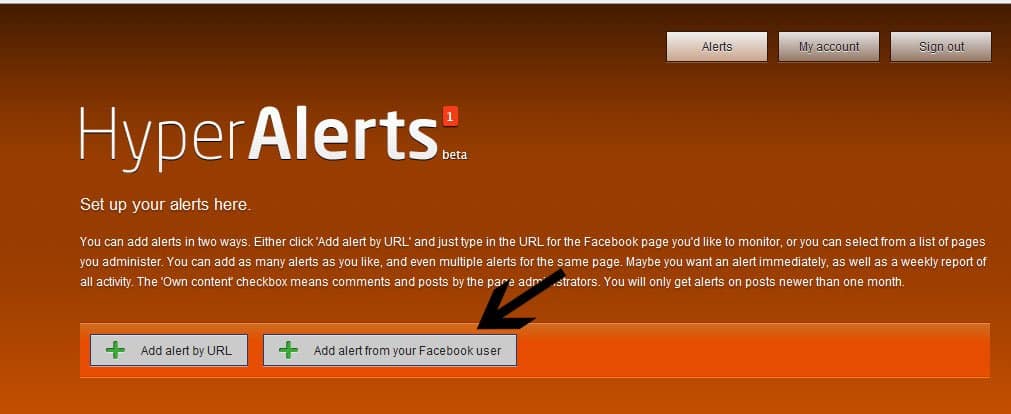
 2. Next choose whether to “Add alert by URL” or “Add alert from your
Facebook user”. For this tutorial I will choose Add alert from your
Facebook user because I always check my Facebook first before checking
my email.
2. Next choose whether to “Add alert by URL” or “Add alert from your
Facebook user”. For this tutorial I will choose Add alert from your
Facebook user because I always check my Facebook first before checking
my email.
 3. Next is to allow this application to your Facebook. Go ahead and click the “Allow” button.
4. Next is to choose which fan page you would like to be alerted. Click + plus sign or the Add this page button

5. Once you have added your new page alert, you can now set up how frequently you’ll be alerted or notified for any new comments, posts or even your own content.

That’s it, you now have your own automated Facebook fan page alert. Isn’t it nice? You can add more alerts if you want to. Usage of this service is immense, and with the growing need of Social-media engagement, you can take advantage of Hyperlarts to grow your Facebook profile or Page exponentially. If you own multiple Facebook pages, you can use this service to get Email digest for daily activities on your page. You can also set your ideal page via Hyper Alerts, and learn how they are using it to engage with audience. Another great usage is by monitoring your competitor Facebook page, and answers readers questions to build your own social-media profile.
Hope this helps. Please feel free to comment or share your thoughts. Don’t forget to share it to too.
If you have more time, then perhaps you would like to read my article called 10 Facebook Tips and Tricks That You Should Know. Don’t forget to share this article on Facebook and join us on Facebook for more such updates.
Well, gladly there’s a solution for that problem. The website name HyperAlerts has able to recognized this problem in which Facebook has failed to add. The website alerts you when someone has posted or leave comments to your fan page via email. So if you’re managing Facebook fan page, then this tool is another one you need. Another thing also is that, you can add multiple fan page alert and set the time you’ll be notified.
Note: Some images are from the beta version of HyperAlerts, but the usage are same.
Setting up Email alerts for Facebook Fan Page Activities:
Hyperalerts is a great service which let you monitor any Facebook fan page activities. All you need to do is link HyperAlerts with your Facebook profile, and now you can monitor activities on any page that you are the admin of or you have liked. This monitoring includes Updates, comments on your pages, and if you the admin you can also get Email notification for private messages. Recently they have upgraded from beta to Hyperalrts2, which offers very neat and clean interface.1. You need to register at HyperAlerts in order to use their service.
4. Next is to choose which fan page you would like to be alerted. Click + plus sign or the Add this page button
5. Once you have added your new page alert, you can now set up how frequently you’ll be alerted or notified for any new comments, posts or even your own content.
That’s it, you now have your own automated Facebook fan page alert. Isn’t it nice? You can add more alerts if you want to. Usage of this service is immense, and with the growing need of Social-media engagement, you can take advantage of Hyperlarts to grow your Facebook profile or Page exponentially. If you own multiple Facebook pages, you can use this service to get Email digest for daily activities on your page. You can also set your ideal page via Hyper Alerts, and learn how they are using it to engage with audience. Another great usage is by monitoring your competitor Facebook page, and answers readers questions to build your own social-media profile.
Hope this helps. Please feel free to comment or share your thoughts. Don’t forget to share it to too.
If you have more time, then perhaps you would like to read my article called 10 Facebook Tips and Tricks That You Should Know. Don’t forget to share this article on Facebook and join us on Facebook for more such updates.
Huffly App: Add Live Chat to Facebook Pages
If you are one of those, who keep going to forum, you must have
noticed Shout box, Live chat room to engage users. Specially, when you
are getting bored, Shoutbox, and live chat rooms are great way to kill
time. Facebook offers chat features on Facebook groups,
but Facebook pages lack this feature. Though, there are
third-party Facebook page apps, which will let you add live chat on
Facebook pages.
You will have to allow atleast 7-8 permission box to add Huffly Chat to your Facebook Fan page. Once you have selected on which page you want to add huffly, it will add a chat app at the top of your page. The real chatting will happen on Huffly server, but with branding, and design it will look like Facebook page chat room. Here is a screenshot of ShoutMeLoud chat room, which I created:
 As an admin, you can kick or ban any member who is spamming to
trolling. You can promote any member as a moderator, which will be
useful for a busy chat room. Huffly chat is an interesting idea, but it
lacks few features like, save last chat, and when a users join in, he
won’t be able to see old conversation. Also, even though you have a fan
page with good number of users, it will be good if you can set weekly
timing for chat. You can probably, set a topic and discus about it on
Live chat.
As an admin, you can kick or ban any member who is spamming to
trolling. You can promote any member as a moderator, which will be
useful for a busy chat room. Huffly chat is an interesting idea, but it
lacks few features like, save last chat, and when a users join in, he
won’t be able to see old conversation. Also, even though you have a fan
page with good number of users, it will be good if you can set weekly
timing for chat. You can probably, set a topic and discus about it on
Live chat.
 Over all, it’s a useful free Facebook app to spice up your Fan page
with Live chat. If you are looking for other useful app for your
Facebook page, I recommend you to check out GetPostRocket and Rss Graffiti.
Over all, it’s a useful free Facebook app to spice up your Fan page
with Live chat. If you are looking for other useful app for your
Facebook page, I recommend you to check out GetPostRocket and Rss Graffiti.
Will you be adding Live chat to your Facebook fan page? Also, you could check out ShoutMeLoud fan page here.
How to use Huffly to add Live chat to your Facebook page:
Huffly is a free Facebook app, which will let you add live chat to your fan page, and as a user you can join other Live Facebook chat rooms. The best thing about Huffly is, it adds as an app, so with one click your users can join the Live chat, from your Facebook page. To start using Huffly, you need to go to their homepage, and click on create my chat room.You will have to allow atleast 7-8 permission box to add Huffly Chat to your Facebook Fan page. Once you have selected on which page you want to add huffly, it will add a chat app at the top of your page. The real chatting will happen on Huffly server, but with branding, and design it will look like Facebook page chat room. Here is a screenshot of ShoutMeLoud chat room, which I created:
Will you be adding Live chat to your Facebook fan page? Also, you could check out ShoutMeLoud fan page here.
How to Add Facebook Fan Page to Website
By now, we have learned how to create Facebook page for Business and now, it’s time to increase fans on your Fb pages. One of the tip, which I have given in my last post is Add Facebook fan page
to your Website. Saying that, I mean Facebook offers a widget which you
can embed in your blog, and use can hit like button to join your
Facebook fan page. This sound super easy and this is one of the easiest
way to start seeing increase in number.
Now its time is to make your Facebook Pan page popular and getting more fans on your fan page. You can also buy likes on Facebook and also but Fans, but such likes and Fans won’t be real fan and will not add much value. Your target should be convert regular & loyal readers into your Fb page fans. There are many ways to increase your fan on your blog and we have shared some of them earlier but one of the most effective way is by adding Facebook fan widget on your blog. This will help your readers to quickly like your fan page on Facebook without leaving your blog.
So once, you are on Facebook like box page, change the URL with your Fan page URL. For reference, in this video tutorial, I have used Page URL as http://Facebook.com/ShoutMeLoud. Similarly, you can add your fan page. In case if you have not set up Custom URL for your fan page, do it right away.
Once you have added your URL, the preview tab will automtically start showing widget for your blog. You can make changes from settings, like specify a custom size for Facebook fan page widget. I usually, remove stream and header part as they add more into loading time. If you don’t want to show Facebook fan photo, you can hide that too from settings. Though, Facebook fan photo into your Facebook fan box, will add more personal touch for new readers, as Facebook shows your friends photo when you browse a site using Facebook like box.
So here, is a quick screenshot of my settings:
 Once
you have made all the settings, click on get code and you will get
three code options to add the widget on your blog. Go to iFrame code and
copy the code given. Now go to your WordPress or BlogSpot blog widget
section and add a text widget and paste the code. If you have copied and
pasted the code properly, in no time you will see your Fb fan page
widget live on your blog.
Once
you have made all the settings, click on get code and you will get
three code options to add the widget on your blog. Go to iFrame code and
copy the code given. Now go to your WordPress or BlogSpot blog widget
section and add a text widget and paste the code. If you have copied and
pasted the code properly, in no time you will see your Fb fan page
widget live on your blog.

This is how this widget looks on my blog sidebar:

Personally, I have realize Fan page widget works the best to grow your followers on Facebook and more important this way, you will get more loyal readers as people who would be subscribing to your page are those who liked your content. But, there is a down side of this widget and that is load time. I have seen a drift of atleast 0.8 sec after adding and removing this widget. Though I guess, you won’t mind comparimsing on the speed for getting more fans, as social media plays an important role in better ranking.
Here is a video tutorial, which will help you understand the complete process of creating Fan box and adding it onto your Website in easy 1-2-3 step:
Do let us know if you have faced any problem while trying to add Facebook Fan page into your Website?
Do share your experience with Facebook fan page box and do you also feel this widget adds too much into loading time?
Why you should add Facebook fan page to Website:
Many people thing that Facebook is other domain and why should we pass on traffic to that. Here are something, which will understand you how adding Facebook fan page to website is going to help. Facebook has a huge subscriber base, when a user like your Facebook page, he will be able to see all your updates on his wall. Specially for blogs, you can use app like RSS graffiti to auto-publish new content on your Fan page.Now its time is to make your Facebook Pan page popular and getting more fans on your fan page. You can also buy likes on Facebook and also but Fans, but such likes and Fans won’t be real fan and will not add much value. Your target should be convert regular & loyal readers into your Fb page fans. There are many ways to increase your fan on your blog and we have shared some of them earlier but one of the most effective way is by adding Facebook fan widget on your blog. This will help your readers to quickly like your fan page on Facebook without leaving your blog.
Guide to add Facebook Fan page Like box:
Very first step is to go to Facebook social plugins page and select Facebook like box for pages. Here is a direct link to that page. Apart from Like box, I would suggest also have a look into other Facebook social plugins which might be useful to make your Website more social.So once, you are on Facebook like box page, change the URL with your Fan page URL. For reference, in this video tutorial, I have used Page URL as http://Facebook.com/ShoutMeLoud. Similarly, you can add your fan page. In case if you have not set up Custom URL for your fan page, do it right away.
Once you have added your URL, the preview tab will automtically start showing widget for your blog. You can make changes from settings, like specify a custom size for Facebook fan page widget. I usually, remove stream and header part as they add more into loading time. If you don’t want to show Facebook fan photo, you can hide that too from settings. Though, Facebook fan photo into your Facebook fan box, will add more personal touch for new readers, as Facebook shows your friends photo when you browse a site using Facebook like box.
So here, is a quick screenshot of my settings:
Once
you have made all the settings, click on get code and you will get
three code options to add the widget on your blog. Go to iFrame code and
copy the code given. Now go to your WordPress or BlogSpot blog widget
section and add a text widget and paste the code. If you have copied and
pasted the code properly, in no time you will see your Fb fan page
widget live on your blog.This is how this widget looks on my blog sidebar:
Personally, I have realize Fan page widget works the best to grow your followers on Facebook and more important this way, you will get more loyal readers as people who would be subscribing to your page are those who liked your content. But, there is a down side of this widget and that is load time. I have seen a drift of atleast 0.8 sec after adding and removing this widget. Though I guess, you won’t mind comparimsing on the speed for getting more fans, as social media plays an important role in better ranking.
Here is a video tutorial, which will help you understand the complete process of creating Fan box and adding it onto your Website in easy 1-2-3 step:
Do let us know if you have faced any problem while trying to add Facebook Fan page into your Website?
Do share your experience with Facebook fan page box and do you also feel this widget adds too much into loading time?
Subscribe to:
Posts (Atom)